
1PPP Game Deposit and Withdrawal Process
Making a deposit or requesting a withdrawal should be simple, clear, and easy to understand. On 1PPP Game, players may need to add funds before using paid games and may later request a withdrawal from their available balance. The exact options, limits, processing time, and requirements can vary depending on the account and the payment service available at the time.
For Pakistani users, local payment methods are particularly useful because they can make transactions more convenient. Commonly used options may include Easypaisa, JazzCash, and Pakistani bank accounts, although the payment methods actually shown inside your 1PPP account should always be treated as the final list.
Below is a straightforward guide explaining how deposits and withdrawals generally work, what information you may need, and what to check before confirming a transaction.
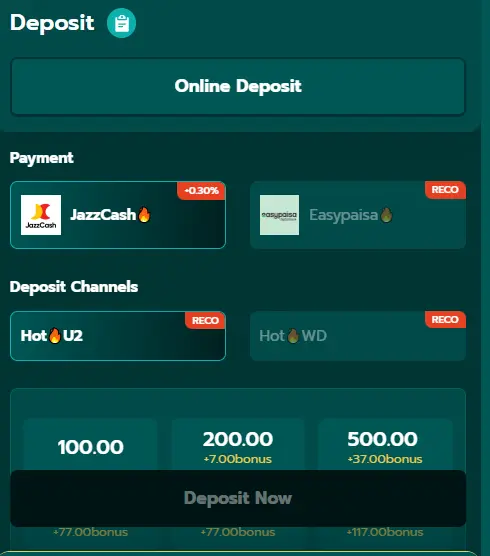
1PPP Game Deposit Methods
The deposit section is normally used when you want to add money to your gaming balance. Before sending money, open the deposit page in your account and check the available payment methods, account details, minimum amount, and any applicable charges.
Payment Methods of 1PPP App
| Payment Method | How It Can Be Used | What to Check Before Payment |
|---|---|---|
| Easypaisa | Send the required amount through your Easypaisa account using the details displayed by the platform. | Confirm the recipient details and transaction amount. |
| JazzCash | Use your JazzCash account to transfer the requested amount according to the instructions shown in the deposit section. | Check the mobile/account number carefully. |
| Pakistani Bank Account | Transfer funds from your bank account using the bank information provided by the platform. | Verify account title, account number, and bank name. |
| Other Available Methods | Some accounts may show additional payment options depending on current availability. | Only use methods displayed inside your account. |
How to Deposit Money in 1PPP Game?
Follow these steps carefully:
- Log in to your account.
- Open 1PPP Game and sign in using your registered details.
- Open the Wallet or Deposit section.
- Look for an option such as Deposit, Recharge, or Wallet.
- Choose a payment method.
- Select Easypaisa, JazzCash, bank transfer, or another method that is currently available to you.
- Enter the deposit amount.
- Type the amount you want to add. Make sure it meets the displayed minimum and maximum limits.
- Check the payment information.
- Carefully review the recipient number, bank details, account title, or other information provided on the payment page.
- Complete the payment.
- Open your selected payment service and transfer the amount according to the instructions.
- Submit transaction details if required.
- Some platforms may ask for a transaction ID, reference number, or payment screenshot.
- Wait for the balance to update.
- Do not send the same payment repeatedly if your balance does not appear immediately. First, check the transaction status or contact the platform’s support.
What to Check Before Making a Deposit in 1PPP Game
A few seconds of checking can prevent many payment problems.
- Make sure you are logged into the correct account.
- Confirm the recipient details before transferring money.
- Check the minimum and maximum deposit amount.
- Keep your transaction ID or receipt.
- Never share your PIN, password, or OTP with another person.
- Do not send money to payment details received from an unknown person.
- Check whether any transaction fee applies before confirming.
1PPP Game Withdrawal Process
A withdrawal is different from a deposit because the platform may require account verification before releasing funds. You should first check whether your balance is eligible for withdrawal and whether any wagering, verification, or minimum-withdrawal requirements apply to your account.
The withdrawal method may also need to match the payment account you use. For this reason, always read the instructions displayed on the withdrawal page before submitting your request.
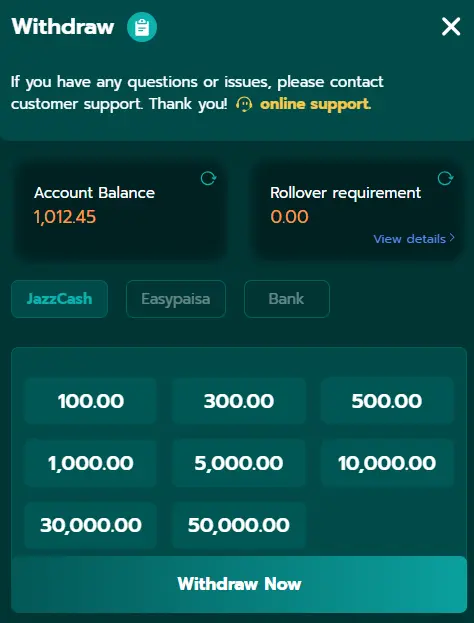
How to Withdraw Money from 1PPP Game
- Log in to your account.
- Open the game and enter your registered login details.
- Open the Wallet section.
- Select Withdraw, Cash Out, or the equivalent option.
- Choose a withdrawal method.
- Select an available option such as Easypaisa, JazzCash, or bank transfer.
- Enter the withdrawal amount.
- Make sure the amount is within the displayed withdrawal limits.
- Enter your payment details.
- Provide the correct mobile wallet number or bank information.
- Review everything carefully.
- A wrong account number can cause delays or payment problems.
- Submit the request.
- Confirm the withdrawal after checking all details.
- Keep the request information.
- Save the withdrawal reference or request number if one is provided.
- Wait for processing.
- Processing time can vary according to the platform and selected payment provider.
Easypaisa Withdrawal
If Easypaisa is available in your withdrawal section, select it and enter the required mobile account details. Make sure the account belongs to you and that the information matches the requirements shown by the platform.
Before submitting the request, double-check the number. Once a withdrawal has been processed, correcting an incorrect recipient number may be difficult.
JazzCash Withdrawal
For JazzCash, choose the JazzCash option if it appears in your account. Enter your registered number and the requested withdrawal amount.
Check the details carefully before confirmation. Keep the transaction or withdrawal reference so you have a record if you need to ask support about the payment.
Pakistani Bank Account Withdrawal
Bank transfer can be useful for users who prefer receiving funds directly into a bank account. The platform may ask for information such as the account title, bank name, account number, or IBAN.
Enter every detail exactly as required. A mismatch between account information and the registered user details may result in additional verification or processing delays.
Deposit deducted but balance is not updated.
First, check your payment account and confirm that the transaction was actually completed. Keep the receipt and transaction ID. Do not immediately make another deposit simply because the balance has not appeared.
Wrong payment details
If you accidentally send money to incorrect details, contact the relevant payment provider and the platform’s support as soon as possible. Recovery is not guaranteed, so checking the details before payment is important.
Deposit rejected
Check whether the amount meets the minimum limit and whether the selected payment method is currently available. If everything appears correct, contact support with the transaction information.
Common Withdrawal Problems and What to Do
Withdrawal is still pending.
Processing can take time depending on the platform and payment provider. Check the withdrawal status in your account before submitting another request.
Withdrawal is rejected
Review the reason shown in your account. Possible requirements can include identity verification, incorrect payment information, minimum withdrawal limits, or other account conditions.
Bank or wallet details are incorrect.
Contact support promptly and provide the withdrawal reference. Do not give your password, PIN, or OTP to anyone claiming to be support.
Tips for Safer Transactions
- Use only payment details displayed through your account.
- Never share your OTP or payment PIN.
- Keep screenshots and transaction references.
- Check the recipient name before sending money.
- Avoid third parties who promise to process payments for you.
- Read the current deposit and withdrawal rules before making a transaction.
- Set a personal spending limit and never deposit money you cannot afford to lose.
- Remember that casino-style games involve financial risk and winnings are not guaranteed.
Final Words
The deposit and withdrawal process should not be complicated if you carefully follow the instructions shown in your 1PPP Game account. For Pakistani users, Easypaisa, JazzCash, and bank transfers can be convenient options when they are officially available.
The most important thing is to verify every payment detail before sending money and to keep your transaction records. For withdrawals, make sure your account information is correct and check whether any verification or minimum withdrawal requirement applies.
Payment options, fees, limits, and processing times can change, so the information displayed inside your current account should always take priority over older guides. Play responsibly, protect your financial information, and never treat gaming as a guaranteed way to make income.